




Online transactions simplify your business
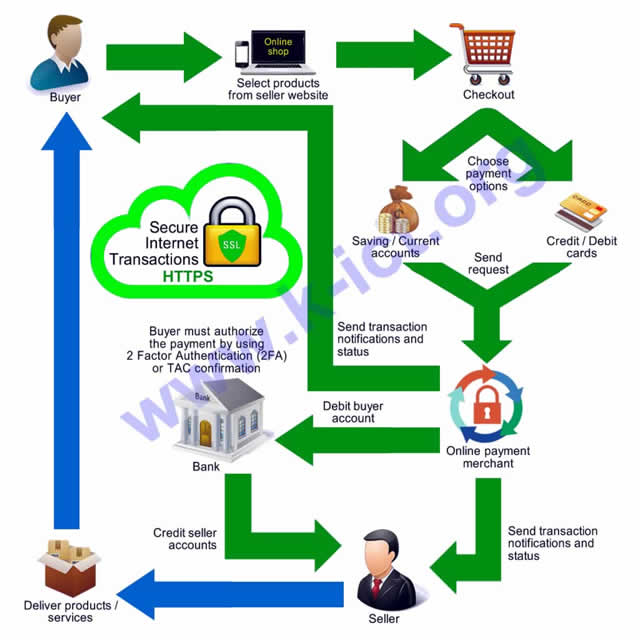
Let we show you a simple situation to compare between conventional and online transactions. A shirt seller, Ain is selling shirts at her shop. She is still using conventional transaction because of having less knowledge in online transaction application. Malik is also selling shirts but he prefer to sell online.
Let’s compare their transaction flow as listed below;
|
Transaction steps
|
Ain
Conventional transactions |
Malik
Online transactions |
| Initiating order | Buyer drives to the shop located about 5 km, select items, put them in the basket, and bring to the counter.
Estimated time taken : 25 minutes
|
Buyer visits the seller web site, search for the desired items using the search field, click “Add to cart”, and “Checkout”.
Estimated time taken : 10 minutes
|
| Creating invoice | Seller creates new invoice using the billing application software, keying-in the bought items, and print-out invoice for the buyer. The grand total amount is MYR 201.00
Estimated time taken : 3 minutes
|
Sellers’ portal prompts for the buyer name, phone number, email address, and shipping address. Buyer provide those information and click on the “Next” button. The grand total amount is MYR 220.00
Estimated time taken : 3 minutes
|
| Making payment | Buyer opens the wallet, take cash notes, sum them, and pay MYR 210.00 to the seller.
Estimated time taken : 3 minutes
|
Sellers’ portal prompts for the payment options those are “Internet Banking” and “Credit Cards”. Buyer then choose to pay using Internet Banking by clicking on the “Internet Banking” button.
Estimated time taken : 0.5 minutes
|
| Processing payment | Seller checks the cash notes, verify the payable amount, and return the balance MYR 9.00 to the buyer.
Estimated time taken : 2 minutes
|
Sellers’ portal redirect the buyer to the Internet Banking login page. Buyer has successfully logged-in using his username and password, then prompted for the Transaction Authorization Code (TAC). Buyer provides it correctly then clicks on the “Confirm” button. The bank verify that payment and return the result to the sellers’ portal.
Estimated time taken : 2 minutes
|
| Creating receipt | Seller mark the invoice as “Paid”, create the payment receipt, give that receipt to the seller and say “Thank you”.
Estimated time taken : 2 minutes
|
Sellers’ portal display the result to the buyer along with the transaction receipt. Finally both seller and buyer get a copy of that transaction receipt including “Thank you notes” from the seller’s portal via email. Bank also send an email to both of them as the verification.
Estimated time taken : 1 minute
|
| Ending transaction | Buyer need to go home while seller need to keep the cash notes in the secure storage box.
Estimated time taken : 15 minutes
|
Buyer will wait for the buyer to send the bought items while seller needs to wrap the bought items and bring them to the nearest post office.
Estimated time taken : 5 minutes
|
| Summary | Approximately 50 minutes required to complete a transaction with the amount of MYR 201.00 |
Approximately 21.5 minutes required to complete a transaction with the amount of MYR 220.00 |
Accepting payment online is more efficient, secure, and safer
Prev : Sell Online
Next : Online Advertising